
Configuration of the 1747 PIC-AIC+ Driver
Configuration of the 1747 PIC-AIC+ Driver
In this practice, we will configure the 1747 PIC/AIC+ driver in RSLinx, on a Windows XP Professional SP3 operating system. It is important to know if the operating system has been updated from SP2 to SP3 or if it came by default as in my case, because this can influence whether we get an error when configuring the driver. Warning: It does not work on virtual machines at the moment; the tests I have conducted have not been satisfactory, as I had already read, but I have conducted my tests to verify it.
The configuration I am going to perform will be the one shown in the following figure:

1.- The first step, as we have done in previous practices, is to run RSLinx and add a new driver by clicking on the cable icon.

2.- When adding the desired driver, in this case the 1747 PIC/AIC+, the following error message appears.

3.- Searching for information on why this error occurs, in the Forum plctalk.net I found how to solve it thanks to the help of Mr. Mickey and Dmroeder, and this is a possible solution, since with SP3 it is initially not compatible.
Here you can download the serenum.sys SP2

4.- By following these steps, upon restarting and reconfiguring the driver, the result is satisfactory as shown below.

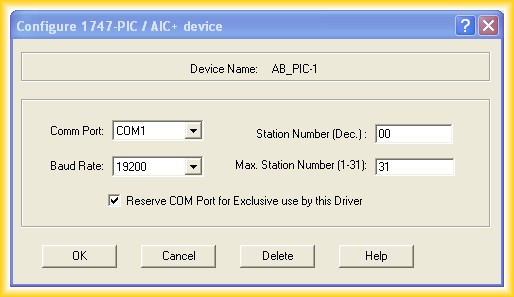
5.- I can now access the PLC SLC 5/03 through the RJ-45 port (DH-485).

6.- And as detailed in the previous description, it is observed in the device manager how the COM port is dedicated to the AIC+.

6.- Another alternative is to download the application developed by Dmroeder, which you can download at the following link thanks to him sharing it.
August 29, 2012