
WinCC Licenses


Basic explanation of the licenses we need:
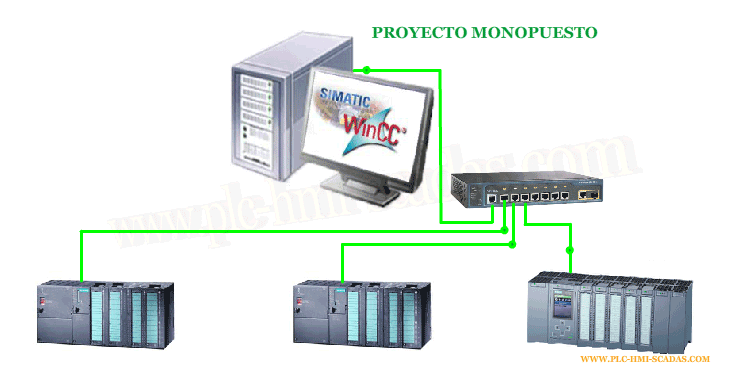
The first thing we need to be clear about is the type of project that is going to be implemented, and we will differentiate between single-user and multi-user projects.
SINGLE-USER PROJECT:
At a minimum, we need the Runtime license, and depending on the number of tags
WinCC RT (Number of power tags 128-1024-2048-8192 ...)
If we also want editing functionality, it will be the RC which is in turn RT.
WinCC RC (Number of power tags 128-1024-2048-8192 ...)
Both licenses come with 512 tags for TagLogging; if we need more, we acquire another license and add it to the 512 that come by default. If we have more than 8 connections with PLC, the Simatic Net license is required.
Whether it is the RT / RC license, it covers the following:
Tag Logging (512)
Alarm Logging
Report Server
User Archives
Independent licenses and the functionality is by default in the project and we have not installed any Add-on
Web Navigator / WebUx: Separate license for the x clients, which nowadays can be concurrent with WebUX
Data Monitor:
OPC UA Server: Separate license to add this functionality, the license is from the Connectivity Pack
WinCC Redundancy: Redundancy functionality with two servers.
All Add-ons we add require their license. Some of them are the following:
-WinCC Performance Monitor
-WinCC Audit
-WinCC Calendar / Event Notifier
-WinCC ODK
-WinCC Industrial Data Bridge
MULTI-USER PROJECT
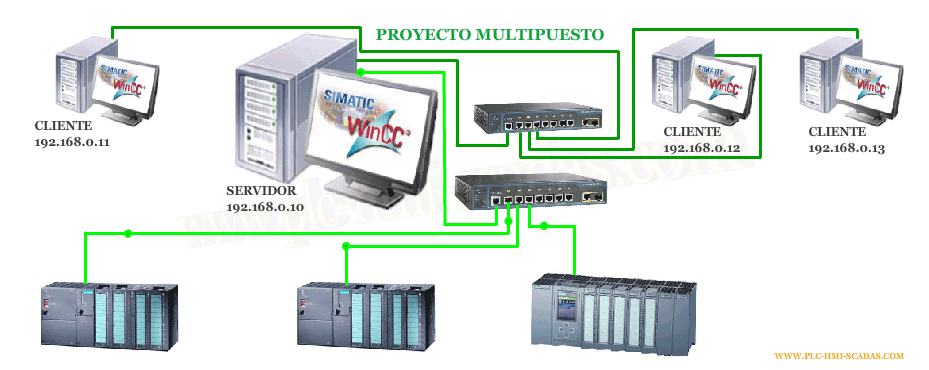
In a Server - Client architecture, we will need for the server, just like a single-user project, but we need to add the Server license
WinCC Server
And for the clients, there are two options: either the WinCC Client license or the RT128 license.
If we consider the following image as an example, this will be what we need
SERVER
(1) WinCC Server
(1) WinCC RC(1024) "Editor and Runtime" or (1) WinCC RT(1024) "Runtime"
CLIENT
(3) WinCC RT128
As there are only 3 PLCs connected, we do not need the Simatic Net license
31-01-2019
All trademarks, software, logos are the property of their respective owners.