
Intouch, WWPoke() - WWRequest() Functions
Example of WWPoke() and WWRequest() Functions
In the following practice, we will see an example of the WWPoke() and WWRequest() functions, although we will give more importance to the WWRequest() function due to the nature of the exercise.
First of all, it should be clarified that these and other functions are used for DDE communications, the objective of this example will be in an Excel sheet, saving values such as temperature and the time at which it was saved.
One of the most important points to highlight is that for these functions to work correctly, the application we are working with must be running. We imagine that this will be my main image and in its properties
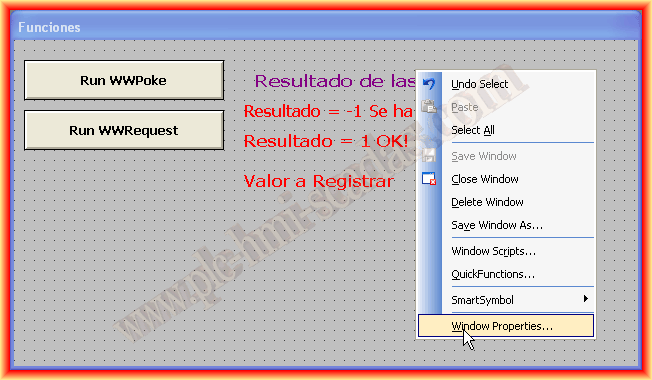
Let's go to the Script button, as the first thing we will do when our application starts is to ask if we want to run Microsoft Excel, although we could have run it directly without asking, but we will take the opportunity to see how to create pop-up windows.

The Script is as follows: in the first line, it checks if Excel is running; if it is running, it returns Microsoft Excel - "Name of the open workbook plus extension".
With the StringCompare function, I will compare what the InfoAppTitle function has returned with "nothing", so if it returns a 0, it is not running, and we create an object of type Wscript.Shell, which we will use to ask the user if they want to run Excel. If the answer is yes, we proceed to use the StartApp function, passing it as arguments the specific file path if applicable or the name of the application if applicable.

Once we have Excel open, we can use the WWPoke functions to write to the Excel sheet or the WWRequest function to read from it.
For the example, I created a button, although ideally, it should execute every time there is a change in the variable of interest plus a tolerance, or according to needs.
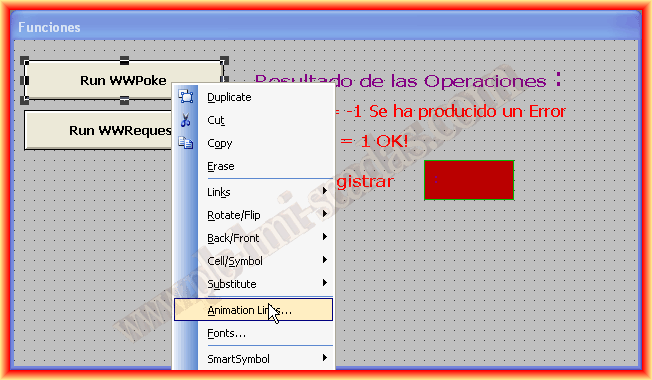

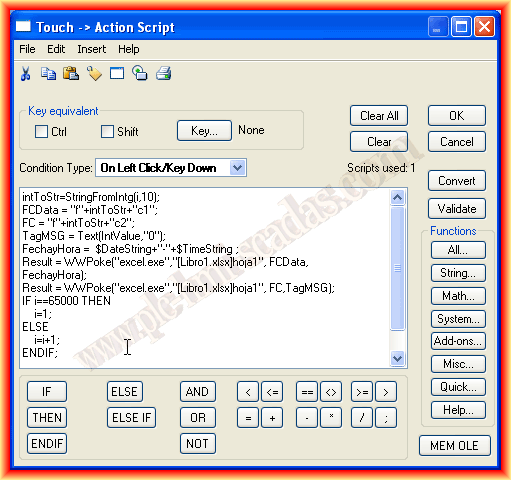
The Script to log the data is as follows: we will consecutively use the WWPoke() function since in one cell of Excel we will write the day and date concatenated in one variable and in another the value of the variable to be logged.
The arguments of the WWPoke function are as follows: (1st Application name, 2nd Topic name, 3rd Item name, 4th String with the value to write) Extensive information on all functions can be found in the help.
I have defined a variable at the Global level that I will use as an index to change cells consecutively.
The item name "3 Argument", is a String type variable that I have used to change the cells, since if we want to write in a cell, we only need to pass the Row and Column, for example "F1C1", considering that the installation language of Excel is Spanish; if it is English, it would be Row and Column "R1C1".
Every time I press the button, in this case, I do the following: A concatenation "f" + intToStr + "c1" -> where intToStr is the conversion of the variable i to String to concatenate with the + symbol.
In this case, when it reaches 65,000 records, it will start deleting the old ones and writing again. The example of the WWRequest function is exactly identical; we read the item and store it in the String 4 Argument of the function, and then convert this String to Real format.

An example of the objective of this practice is as follows: every time we press, we have logged the date and time plus the value of the variable; now adapt it according to needs.

To conclude, a short video of operation in Runtime.
May 25, 2013
If you liked it or found the information useful, share it...