
S7-1200 Web Server
S7-1200 Web Server
In this practice, we will check the S7-1200 Web Server, which is an option included in all S7-1200 and its future generations...
We start from the assumption that we already have a project and we are going to activate the Web Server

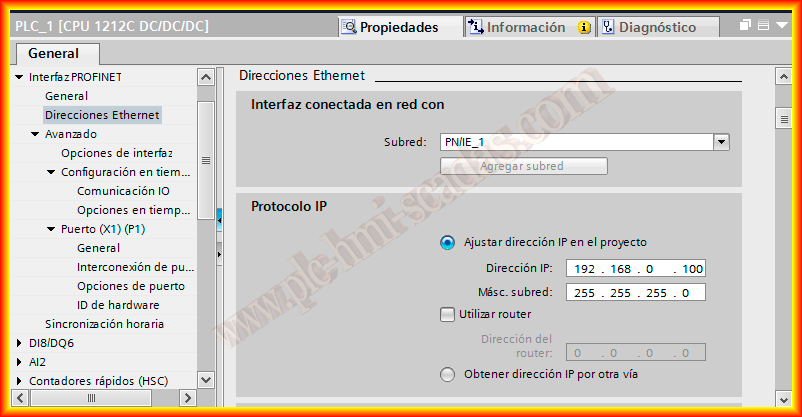
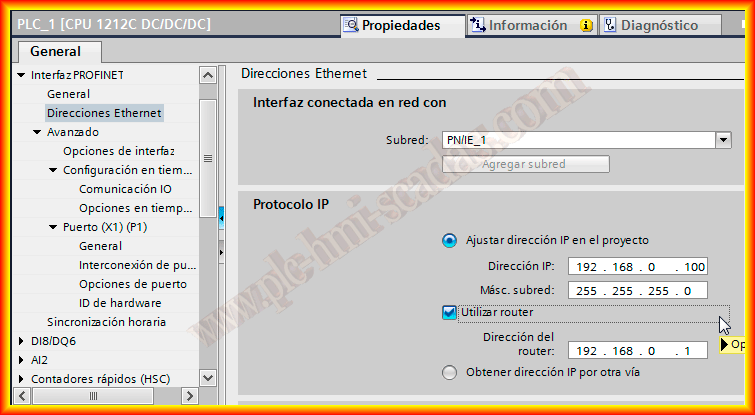
Our project will have an IP address for the PLC and the connection to a subnet, we basically have two options, either access the Web Server within the same subnet, where it will be connected to a switch, where it is not necessary to select the checkbox Use router, on the other hand if we want to have access from the internet, it is necessary to configure the gateway, which is the address of the router
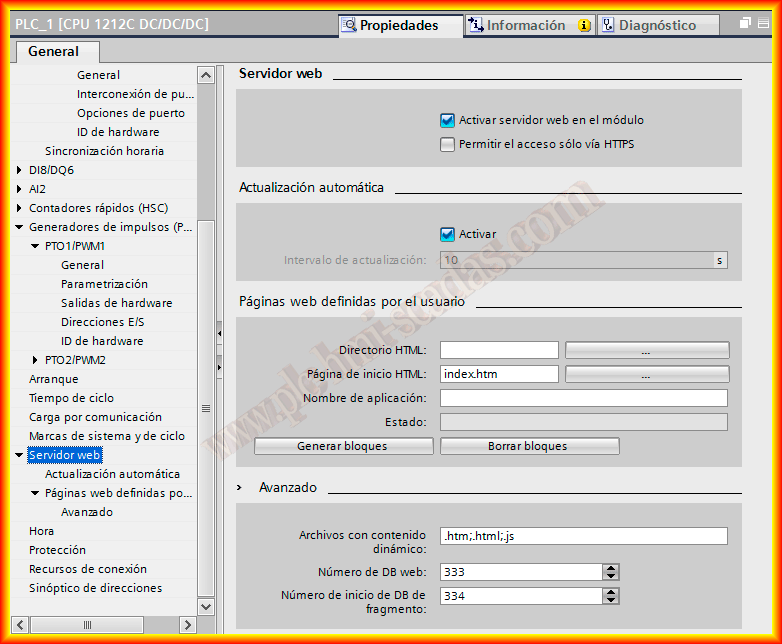
The next step is to navigate to the Web Server option and activate it, we also have the option to select that the connection is only secure with HTTPS
Automatic update is recommended to be activated when we are viewing the status of the variables, by default it is selected.
Finally, we have the option to upload our own pages, but it is optional, so in this first part we leave it as default
We can now compile and upload our project to the PLC, with these simple steps, we can now access the Web Server, we open the browser and enter the address of the controller, the web page will automatically open.
If we want to access the Web Server from the Internet, we need to open ports 80(HTTP) and 443(HTTPS) on the router.

To see the options, here is a small video where the available pages can be observed.
March 28, 2013